
Travel Nesting
Slow travel for introverts who want to go all the places...but not do all the things.

Trip Comparison Planner
See what each trip will actually cost – before you book anything
Line up to 5 trips side by side, fill in the numbers you've found and let the spreadsheet do the math. Not just the flights. The whole thing.
Instant download • Excel, Google Sheets & LibreOffice • Use it on every trip you ever plan
THE PROBLEM
You've been researching this trip for days. You've looked at flights, poked around at apartment prices, maybe jotted some numbers on the back of an envelope you've since lost. You have seventeen browser tabs open and still no answer to the only question that matters: which option is actually most affordable?
That's because the answer isn't in any single tab. A $304 flight and a $64 flight to the exact same city can be four weeks apart – and the cheaper month might also come with cheaper housing. It’s the total cost, not any single line item, that is the number showing you whether a trip works for your budget.
Most people never see that number until they're already there.
This spreadsheet shows it to you before you book anything.
WHAT IT DOES
Enter what you've found for each option – flights both ways, accommodation, fees, whatever applies to your trip – and estimate what you haven't found yet. The spreadsheet totals it all and adds the number a quick glance can't give you: a calculated monthly cost, so a 4-week trip and a 12-week trip land on the same scale instead of two totals nobody can actually compare.
Then it goes further than a quick calculation. Each trip column has room for the details you'd otherwise lose in your notes app: airports and flight times, number of stops, airline, accommodation type and booking platform, cost per night, visa and entry rules, WiFi quality, time zone, even whether there's an actual desk to work at.
When you're ready to book, everything you found is still there.

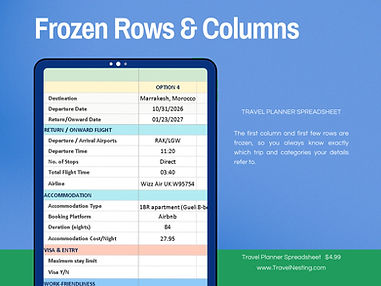
And because that's a lot of rows, the headers are frozen in place.
Scroll down to compare workspace comfort or visa rules and the trip names stay visible at the top, so you always know which column is Marrakesh and which one is the hostel in London.
This may seem like a small thing...until you've tried to use a spreadsheet without it.

Once you've picked your trip, the built-in Budget Tracker takes over.
Log what you expected to spend before you go, then what you actually spent as you travel – the Difference column does the subtraction so you're not the one noticing you went $340 over on food only after you're home wondering where it went.
Do this once and your next trip's estimates stop being guesses.
WHAT'S INSIDE
-
3 Trip Comparison tabs – so last month's research doesn't disappear when this month's questions start
-
3 Budget Trackers – linked to their own comparison tab, so your spending stays tied to the trip you actually took
-
Auto-calculated totals – cost per night, per month and in total, so you're comparing the number that actually decides it
-
Frozen headers – trip names and row labels stay in view while you scroll, so comparing details 40 rows down never means scrolling back up to check which column is which
-
Full Instructions tab – setup steps, customization tips and slow-travel-specific advice
-
Any currency – the sheet doesn't care whether you think in dollars, euros or lek


-
Download the file and open it in Excel, Google Sheets (free) or LibreOffice (also free). No installation, no signup, no learning curve beyond typing in cells.
-
Enter each trip option you're considering – destination, dates and the costs you've found so far.
-
Read the answer. All 5 options, totaled and side by side.
The rows are editable, so you can rename categories, add cost lines or add a sixth option if you're feeling ambitious. It's your spreadsheet now.
WHO IT'S FOR
Anyone who's trying to decide between options and keeps going in circles. It works for a two-week vacation, a two-month stay or a longer stretch of slow travel. It works when you have one destination and three possible date windows, and it works when you have three destinations and no idea where to start.
I built it because I needed it. The sample data in the listing photos is my own actual research – the same city priced a month apart came out at $1,296 versus $914 per month, mostly because of school holiday flight prices I would never have caught staring at booking sites one tab at a time. That's a $382 difference for leaving 30 days later. Worth knowing before you click Book.
THE DETAILS
Format. One .xlsx file, delivered as an instant download after purchase. Compatible with Microsoft Excel,
Google Sheets, LibreOffice and other office suite spreadsheet programs. Works on phone, tablet or computer.
Do I need spreadsheet skills. No. Every formula is already built. You type numbers, it does the rest. There's a full instructions tab if you get stuck.
Google Sheets. Upload the file to Google Drive, open with Google Sheets, done. The instructions tab walks you through it.
Reusable. Yes, endlessly. Save a blank copy and duplicate it for every trip from now on.
Refunds. Because this is an instant digital download, all sales are final – but if something's wrong with your file, contact me and I'll make it right.
Stop guessing. Compare.
Five options, one view, an actual answer – for less than an airport coffee.